
Pet GPS Tracker Safe Zones can make pet care more convenient, but the useful details live behind the marketing headline. This guide walks through settings, equipment checks, everyday limits, and a practical way to test your own setup. Never interpret a location marker as a safety guarantee. The device cannot replace supervision, safe containment, readable identification, or a registered microchip. If your pet shows discomfort from wearing equipment, remove it safely and contact your veterinarian. See our veterinary disclaimer for the boundary between general guidance and medical advice.
Separate a map boundary from a real barrier
A virtual fence is a boundary you draw in a tracking app. It can trigger an alert when a pet appears to enter or leave a chosen area, but it does not physically keep an animal inside. A cat can cross a doorway or yard line long before a phone notices. Treat the feature as an extra early-warning system beside doors, fencing, a properly fitted collar, identification, and supervision. It cannot replace careful containment, especially near roads or other hazards.
Draw the zone around the real safe area
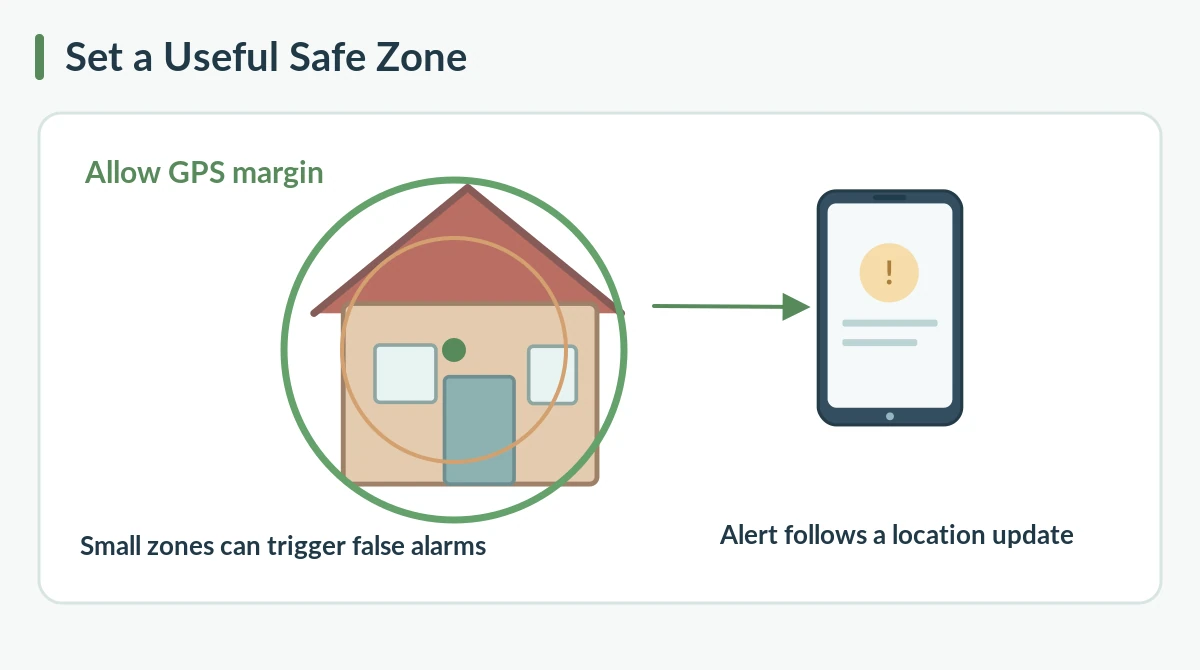
Start by examining the yard, home, driveway, and neighboring properties on the map. Include sufficient margin to allow for ordinary GPS position variation. Drawing a circle tightly around the walls may cause needless alerts when the device estimates a point beyond the line. However, a huge zone can delay useful warnings. Choose the shape your app supports and review its minimum size. Some providers require fairly large zones or warn that tiny custom boundaries may behave unreliably. Use the provider’s current rules rather than a universal measurement.
Learn what causes alert delay
The tracker may first need a new satellite position, then a network connection, and finally a phone notification. Some services use periodic updates during routine mode and faster updates in live mode. A virtual fence alert can therefore lag behind the actual crossing. Phone focus settings and weak internet can add more delay. Do not promise instant delivery. Compare how the manufacturer describes regular reporting, live reporting, and alert handling, and rehearse with a caregiver while the pet stays safely inside.
Reduce repeated false alarms
A map point can drift when a device sits indoors, beneath a roof, close to tall buildings, or under dense trees. If the estimated location jumps across a narrow virtual boundary, an entry or exit notice may be false. Increase reasonable spacing, avoid overlapping areas when the provider recommends it, and verify whether the most recent position is fresh. Check whether the device is in a power-saving zone with distinct behavior. Keep notes about the time and circumstances so support staff can reproduce the issue.
Test notifications without creating an escape risk
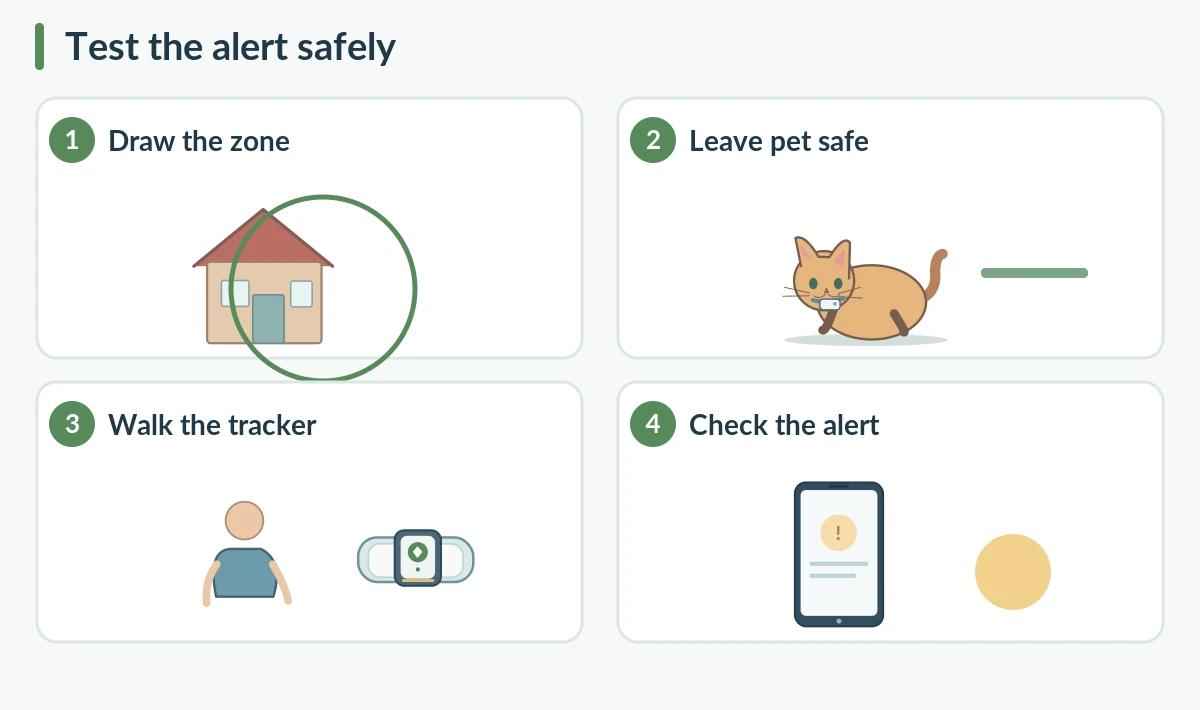
You can evaluate a zone by holding the tracker and walking across the boundary yourself, away from your pet. Keep the animal inside with a responsible adult. Confirm that the app shows the transition and that the owner’s phone produces a notification. Then check the return crossing. Repeat once at ordinary walking speed, rather than running repeated tests that drain the battery. If no alert arrives, investigate settings and coverage before trusting the feature.
Understand safe zones and no-go zones
An app may offer labels for places your pet can visit and areas you would prefer it to avoid. Both are software boundaries. A no-go label does not repel a dog or cat or block a road. Use it to help a person decide where to search, not to authorize unsupervised access. When placing either zone, consider roads, neighboring yards, water, and likely escape routes. Keep the boundary readable and simple enough for another caregiver to understand during a stressful moment.

Check phone permission and shared alerts
Confirm the tracking app has the notification permission it needs. Check focus or do-not-disturb settings and the internet connection of the phone. If your household shares one tracker, learn which people receive boundary alerts and what subscriptions or permissions are necessary. Do not assume every invitee can edit the zone. Ask family members to verify that they can see the relevant notification in advance. A second contact can help only when sharing is configured correctly.
Plan for a real missing-pet event
If a pet is missing, check the latest timestamp and last reliable location rather than treating the pin as a live video feed. Search safely, ask for help, and follow local lost-pet procedures. A tracker can be out of power, lose its attachment, or move beyond cellular service. Keep a recent photo and updated identification information available. If the dog or cat is near traffic, do not run blindly into the road because a notification suggests a particular direction.
Maintain the boundary when routines change
A move, renovation, new fence, or new caregiver can make yesterday’s safe zone misleading. Review the layout after any important change and retest at least once. Some apps store several boundaries; delete irrelevant ones so caregivers are not confused by old alerts. Keep the zone broad enough for practical accuracy but specific enough to help. This is ongoing maintenance, not a one-time setup that guarantees pet safety for years.
Choose a tracker by alert transparency
Before purchasing, ask whether the service explains geofence minimum sizes, ordinary update intervals, offline behavior, and who receives notifications. Look for straightforward support pages about false alarms. Fancy map colors alone do not tell you how dependable alerts will be in your neighborhood. A realistic owner knows what a zone can and cannot do. Pair it with visible identification, a registered microchip, and a safe home environment.
How We Research
We compared official satellite-positioning guidance, manufacturer documentation for consumer trackers, and established veterinary information about backup pet identification. Features, prices, and service plans can change by model and country. We describe product-specific details as examples rather than promises that every tracker works the same way. We did not perform independent hardware tests or certify any device. Our source review covers October 2026. Learn about our editorial purpose on the About HubPet page.
Sources
Manufacturer guide: Using Virtual Fences (accessed October 2026).
Support article: Virtual Fence Minimum Size (accessed October 2026).
Troubleshooting reference: Notification Permissions (accessed October 2026).
GPS.gov — GPS Accuracy (accessed October 2026).
Safety note: Keep the pet comfortable and supervise any attachment. Electronics, cables and small components must stay out of chewing reach. Never use an app notification to justify unsafe searches near traffic, water or private property. Consult a veterinarian about irritation or injury from equipment.
No. It is only a software alert boundary, not a physical fence, leash or training method.
GPS positions can drift near roofs and buildings. A boundary drawn too tightly may exaggerate small errors.
No. Tracker update frequency, satellite reception, cellular service, and phone notification settings can all add delay.
Leave the animal securely at home and carry the tracker across the chosen line yourself while checking the app and phone alerts.
Not on every service. Power-saving features may reduce reporting, while virtual safe zones define alert boundaries. Read the manual.